
Google Ads Roadmap 2026: 17 Essential Steps to Build, Launch, and Optimize Profitable Campaigns
A Complete Google Ads Strategy Guide for Beginners, Marketers, and Businesses
Running successful Google Ads campaigns requires more than selecting keywords, writing advertisements, and setting a daily budget. The difference between profitable campaigns and wasted advertising spend often comes down to strategy, tracking accuracy, campaign structure, and continuous optimization.
Whether you’re managing Google Ads for an eCommerce business, SaaS company, B2B organization, or local service provider, following a structured roadmap can help improve return on ad spend (ROAS), reduce customer acquisition costs (CAC), and generate higher-quality conversions.
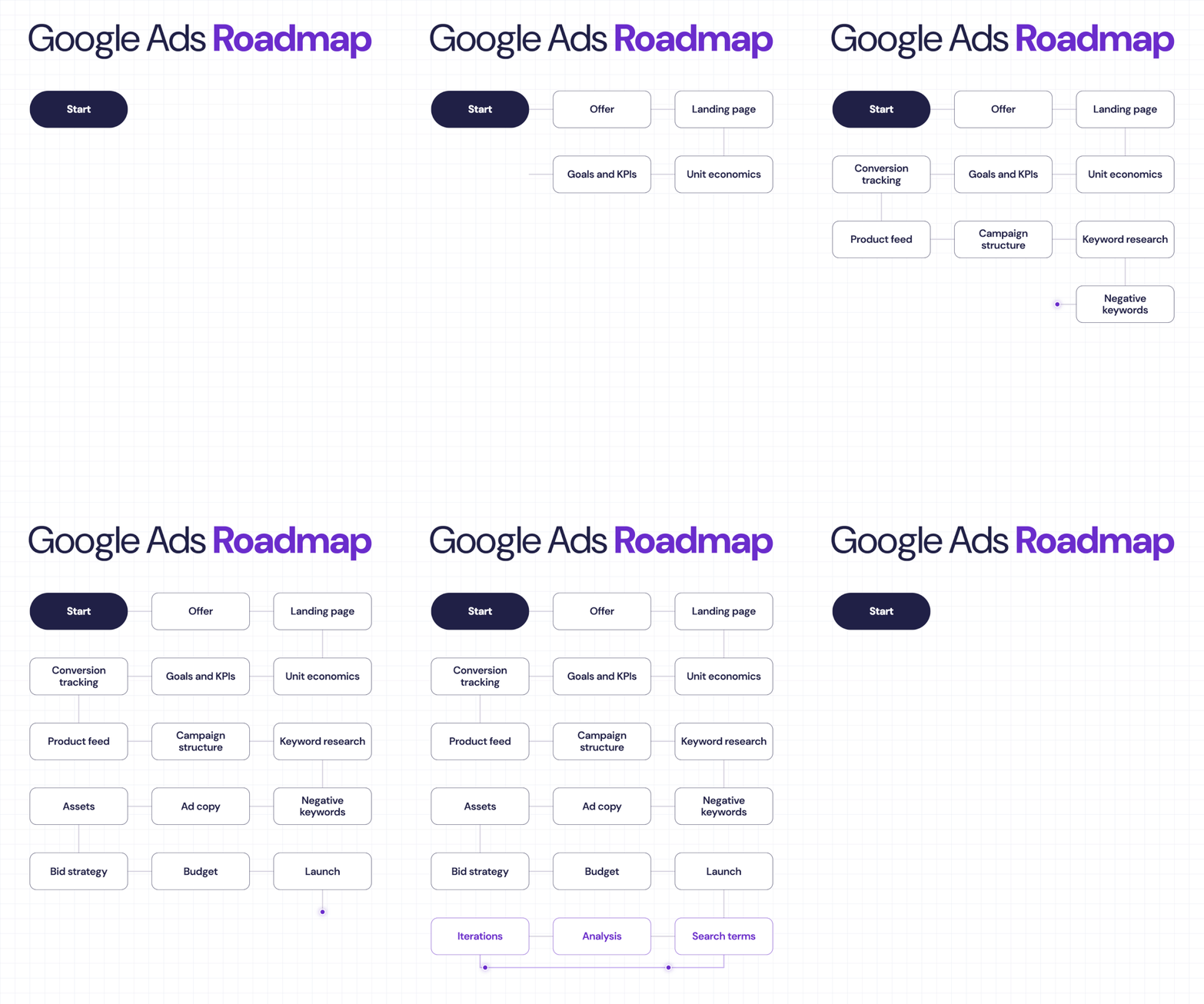
In this guide, we’ll explore 17 essential steps to building and optimizing Google Ads campaigns, from defining your offer to creating a repeatable performance optimization process.
1. Define Your Offer Before Running Ads
Every successful Google Ads campaign starts with a compelling offer.
Before investing in paid traffic, understand exactly what you’re selling, who your target customers are, and why they should choose your business over competitors.
Your offer should clearly communicate:
- The product or service you’re promoting.
- Your unique selling proposition (USP).
- The specific problem your product solves.
- Competitive advantages and customer benefits.
- Pricing, discounts, trials, or other incentives.
Example: Instead of advertising “CRM Software,” a stronger offer might be “Automate Your Sales Pipeline with a Free 14-Day CRM Trial.”
A strong offer increases the likelihood of attracting qualified customers and converting paid traffic into revenue.
2. Build a High-Converting Landing Page
Sending paid traffic to an irrelevant or poorly optimized landing page can quickly exhaust your advertising budget.
Your landing page should closely match the advertisement’s message and provide visitors with a clear path toward conversion.
Landing page optimization checklist:
- Create a compelling headline aligned with the ad.
- Use a clear call to action (CTA).
- Optimize page loading speed and mobile usability.
- Include customer testimonials and trust signals.
- Remove unnecessary navigation and distractions where appropriate.
- Use short forms to reduce conversion friction.
- Test headlines, layouts, and CTA placements.
Pro tip: Use Google Analytics 4 (GA4) and landing page testing tools to identify friction points and improve conversion rates.
3. Understand Your Unit Economics
Before launching a Google Ads campaign, determine how much you can afford to spend acquiring a customer.
Understanding unit economics helps prevent campaigns from generating conversions that are ultimately unprofitable.
Important financial metrics include:
Customer Acquisition Cost (CAC)
CAC = Total Acquisition Costs ÷ New Customers Acquired
Return on Ad Spend (ROAS)
ROAS = Revenue Attributed to Ads ÷ Advertising Spend
Customer Lifetime Value (LTV)
The estimated total value a customer generates throughout their relationship with your business.
Break-Even ROAS
Break-Even ROAS = 1 ÷ Contribution Margin
For example, if your contribution margin before advertising is 40%, your break-even ROAS is 2.5x.
Understanding these numbers helps establish realistic advertising budgets and profitability targets.
4. Establish Campaign Goals and KPIs
Google Ads campaigns should be built around measurable business objectives.
Common advertising goals include:
- Generating qualified leads.
- Increasing online purchases.
- Growing subscription signups.
- Driving phone calls and appointment bookings.
- Improving revenue and customer acquisition efficiency.
Key Google Ads performance indicators:
| KPI | Purpose |
|---|---|
| CTR | Measures ad engagement |
| CPC | Tracks cost per click |
| Conversion Rate | Measures conversion efficiency |
| CPA | Tracks cost per acquisition |
| ROAS | Measures attributed advertising revenue |
| Impression Share | Evaluates search visibility |
| Conversion Value | Tracks attributed business value |
Choose KPIs that align with your business model rather than optimizing exclusively for clicks or impressions.
5. Implement Accurate Conversion Tracking
Conversion tracking is one of the most important components of Google Ads performance.
Without reliable tracking, advertisers cannot accurately evaluate campaign results or provide automated bidding systems with dependable conversion signals.
Recommended tracking setup:
- Configure Google Ads conversion actions.
- Implement Google Tag Manager (GTM), where appropriate.
- Connect Google Analytics 4.
- Track purchases, qualified leads, form submissions, and relevant phone calls.
- Enable Enhanced Conversions where applicable.
- Implement consent management appropriate to applicable privacy requirements.
- Test conversion events using Google Tag Assistant and Google Ads diagnostics.
For B2B businesses, consider importing qualified offline conversions from CRM platforms such as HubSpot or Salesforce.
This helps optimize campaigns toward actual sales opportunities rather than low-quality form submissions.
6. Optimize Your Product Feed
For eCommerce businesses, product feed optimization is essential for Shopping Ads and retail-focused Performance Max campaigns.
Your product feed provides Google with structured information about the products you’re advertising.
Important product feed attributes include:
- Product title and description.
- Price and availability.
- Product category.
- Brand and product identifiers.
- High-quality product images.
- Shipping and return information where required.
Use Google Merchant Center to manage product data and resolve feed issues.
Optimization tip: Include relevant product characteristics such as brand, product type, size, and color in titles when appropriate. Avoid keyword stuffing or inaccurate product descriptions.
For service businesses without physical products, this step may not apply.
7. Design an Effective Campaign Structure
A well-organized campaign structure makes it easier to manage budgets, analyze performance, and scale profitable advertising.
Depending on your business goals, your account might include:
Search campaigns: Capture users actively searching for relevant products or services.
Shopping campaigns: Promote physical products using Merchant Center product data.
Performance Max campaigns: Reach customers across eligible Google advertising inventory using automated campaign optimization.
Demand Gen campaigns: Build demand and generate conversions across supported visual placements.
Remarketing campaigns: Re-engage eligible audiences who previously interacted with your business.
Organize campaigns based on meaningful differences in goals, product categories, geography, profitability, and budget requirements.
Avoid unnecessary fragmentation that limits conversion data and makes campaign management more complicated.
8. Conduct Strategic Keyword Research
Keyword research helps identify what potential customers are searching for and how their search intent relates to your business.
Start with Google Keyword Planner and expand your research using historical search data and third-party SEO tools.
Focus on three categories:
High-intent keywords
Examples: “buy CRM software,” “hire Google Ads consultant.”
Commercial investigation keywords
Examples: “best CRM software for startups,” “Google Ads agency pricing.”
Informational keywords
Examples: “how to automate sales,” “what is conversion tracking.”
For direct-response campaigns, prioritize keywords with strong commercial intent.
Evaluate keywords based on relevance, search volume, estimated competition, and likely conversion value.
9. Build a Negative Keyword Strategy
Negative keywords help prevent your advertisements from appearing for irrelevant searches.
They can improve traffic quality and reduce wasted spending.
For example, a company selling premium CRM consulting services might exclude irrelevant terms such as:
- Free templates
- Student projects
- Jobs
- Internship
- Open-source downloads
However, negative keywords should reflect your actual offer. A SaaS company providing a free trial may benefit from certain searches containing the word “free.”
Review your search terms regularly and update negative keyword lists based on actual user intent.
10. Write High-Performing Google Ads Copy
Effective Google Ads copy should connect the user’s search intent with a clear benefit and a compelling next step.
Strong advertisements typically communicate:
- A relevant product or service.
- A meaningful customer benefit.
- A differentiating feature.
- A clear call to action.
Example:
Headline: CRM Automation for Growing Teams
Headline: Simplify Your Sales Pipeline
Headline: Book a Free Consultation
Description: Streamline lead management, automate follow-ups, and improve sales visibility with tailored CRM solutions.
Use Responsive Search Ads to provide multiple headlines and descriptions that Google can combine and test.
Avoid misleading claims, exaggerated promises, and irrelevant messaging.
11. Add Relevant Ad Assets
Google Ads assets provide additional information that can make advertisements more useful and prominent.
Common assets include:
- Sitelinks
- Callouts
- Structured snippets
- Images
- Calls
- Locations
- Prices
- Promotions
- Lead forms
For example, a CRM consulting company could use sitelinks for “HubSpot Implementation,” “Salesforce Consulting,” “CRM Automation,” and “Book a Consultation.”
Choose assets based on the campaign objective and ensure they link to relevant destinations.
12. Select the Right Bidding Strategy
Google Ads offers automated bidding strategies designed around different campaign objectives.
| Bidding Strategy | Primary Use |
|---|---|
| Maximize Clicks | Drive website traffic |
| Maximize Conversions | Generate as many conversions as possible within budget |
| Target CPA | Aim for a desired average cost per acquisition |
| Maximize Conversion Value | Maximize total conversion value |
| Target ROAS | Aim for a desired return on ad spend |
| Target Impression Share | Prioritize search visibility |
Target CPA and Target ROAS operate as targets within their respective automated bidding approaches.
Choose a strategy based on your conversion tracking quality, business goals, and available performance data.
Avoid making frequent major bidding changes before enough meaningful data is available.
13. Set a Realistic Advertising Budget
Your Google Ads budget should reflect business economics, competition, conversion goals, and your capacity to generate useful performance data.
A simple planning formula is:
Estimated Monthly Budget = Target Monthly Conversions × Expected CPA
For example:
Target conversions: 50 leads
Expected CPA: $30
Estimated monthly advertising budget: $1,500
This is a planning estimate, not a guarantee of 50 leads.
Start with a budget that supports meaningful testing and increase spending when campaigns demonstrate sustainable performance.
Remember that Google Ads can spend more than your average daily budget on individual days, subject to its applicable spending limits.
14. Launch Your Google Ads Campaign
Before launching, perform a complete campaign quality check.
Pre-launch checklist:
- Confirm campaign goals and bidding strategy.
- Verify conversion tracking.
- Review targeting locations and languages.
- Check keyword match types.
- Review negative keyword lists.
- Confirm ad copy and assets.
- Test landing pages and forms.
- Verify budgets and schedules.
- Review applicable advertising policies.
After launching, monitor campaign delivery and tracking accuracy before making major optimization decisions.
15. Review Search Terms Regularly
The Search Terms Report reveals the search queries that triggered eligible advertisements, subject to Google’s reporting and privacy limitations.
This report is especially valuable for identifying irrelevant traffic and discovering new keyword opportunities.
Look for:
Relevant converting searches: Consider adding them as targeted keywords when appropriate.
Irrelevant searches: Add negative keywords to reduce wasted spending.
Expensive searches with poor results: Investigate intent, landing page relevance, and conversion quality.
Emerging opportunities: Identify new products, customer needs, and search patterns.
Search term analysis should become a recurring part of campaign management.
16. Analyze Campaign Performance
Campaign analysis should go beyond CTR and CPC.
The objective is to understand which campaigns, keywords, audiences, and landing pages contribute to profitable business outcomes.
Evaluate performance across four levels:
Traffic quality: Are advertisements attracting relevant users?
Conversion efficiency: Are visitors completing meaningful actions?
Financial performance: Are conversions generating sufficient value relative to advertising costs?
Customer quality: Are leads turning into qualified opportunities and paying customers?
Use Google Ads, GA4, and CRM reporting together to develop a more complete performance picture.
Remember that attribution models and reporting differences can cause Google Ads and GA4 conversion totals to vary.
17. Iterate, Optimize, and Repeat
Google Ads optimization is not a one-time activity.
High-performing campaigns evolve through continuous testing, analysis, and refinement.
A practical optimization cycle includes:
- Review search terms.
- Identify wasted spend and relevant opportunities.
- Refine keywords and negative keywords.
- Improve ad messaging.
- Optimize landing pages.
- Evaluate bidding and budget allocation.
- Analyze conversion quality and profitability.
- Repeat the process.
Test changes systematically rather than modifying multiple major variables simultaneously.
Allow sufficient time for conversion delays and bidding adjustments before evaluating results.
Google Ads Optimization Schedule: Daily, Weekly, and Monthly
A consistent management routine helps advertisers identify problems early and prioritize improvements.
| Frequency | Recommended Actions |
|---|---|
| Daily | Monitor spend, delivery, disapprovals, and major tracking issues |
| Weekly | Review search terms, negatives, conversions, CPA, and ROAS |
| Biweekly | Evaluate ad copy, assets, and landing page tests |
| Monthly | Review budgets, bidding performance, conversion quality, and profitability |
| Quarterly | Reassess campaign strategy, customer economics, and growth opportunities |
The ideal frequency depends on account size, spend, conversion volume, and business seasonality.
Common Google Ads Mistakes to Avoid
Even experienced advertisers can lose money when campaign fundamentals are overlooked.
Some of the most common mistakes include:
- Launching campaigns without validated conversion tracking.
- Optimizing for clicks instead of qualified business outcomes.
- Ignoring negative keywords.
- Sending traffic to irrelevant landing pages.
- Using unrealistic CPA or ROAS targets.
- Making excessive changes during automated bidding adjustments.
- Scaling budgets before validating profitability.
- Failing to connect advertising performance with CRM and sales data.
Addressing these issues can improve campaign efficiency without necessarily increasing advertising spend.
Final Thoughts: Google Ads Success Comes From Systems, Not Shortcuts
The most effective Google Ads campaigns are built around a repeatable performance marketing process.
Start with a compelling offer, develop a conversion-focused landing page, understand your unit economics, establish accurate tracking, and build a campaign structure aligned with your business objectives.
Once campaigns are live, the real work begins.
Regular search term reviews, conversion analysis, creative testing, and strategic iterations help transform advertising data into actionable growth opportunities.
The Google Ads roadmap is simple: Plan → Track → Launch → Analyze → Optimize → Scale → Repeat.
Businesses that consistently follow this process are better positioned to improve advertising efficiency, reduce wasted spending, and build sustainable customer acquisition systems.